WinRAR Password Remover Tool 2019 Crack is a version for you. If you’ve lost or forgotten your WinRAR or Zip archive passwords, WinRAR Password Remover is your best solution for recovery. This utility is easy to use, and works with just a few clicks, and is outfitted with several features designed for professional use such as brute force attack. Adding to this, this WinRAR password recovery utility doesn’t take up a lot of space on your hard drive, and can even be stored on a small flash drive to be accessed from virtually anywhere.
- Change Password Cmd Prompt
- Wifi Password Cmd Prompt
- Delete File Using Cmd Prompt
- How To Crack Winrar Password
- Crack Winrar Password Using Cmd Prompts Windows 10
The recovery process used by the software discussed is extremely simple, where you first need to enter the file you’d like to crack the password to. Once you’ve downloaded and fired up the remover tool, you will be greeted with a file selection menu along with a simple passwords combination checklist. Choose your file and select the appropriate password combinations and WinRAR Password Remover will take care of the rest.
Rar Password Recovery!
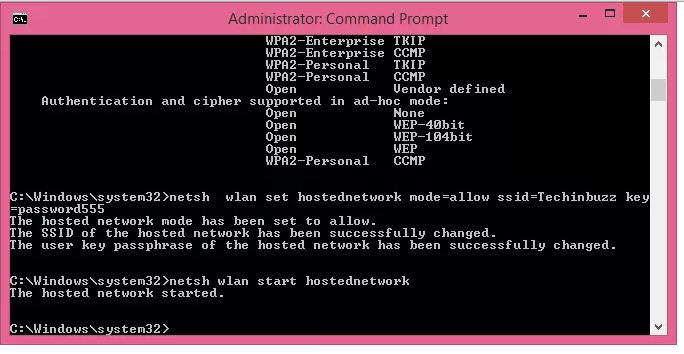
How To Crack WinZip Or WinRar Password. To crack winrar / winzip password follow steps below. Launch Stellar Phoenix Zip Password Recovery and open file that you want to crack 2.Choose Password length, starting characters and character set and click Start. Wait until appear window with cracked password. Download now [ Direct download link (Windows)] HOW TO HACK WIFI PASSWORD USING COMMAND PROMPT (100 working) will not let you down and do what this program was made to do. All features are included and described in notes.txt file after download and installation. How To Hack WiFi Password Using CMD (Command Prompt) This guide is meant for educational purposes only and is completely illegal. It is however a good way to find out the password to your own WiFi network if you can't remember it due to its length or complexity. If you really want to deep dive into hacking WiFi networks and obtaining passwords.
The WinRAR Password Remover features advanced algorithms, which will allow you to recover your WinRAR passwords and gain access to your files and data relatively quickly. One of the noteworthy features of WinRAR Password Remover is that it doesn’t harm your computer or its files in any way, and can crack any password regardless of how strong or weak it is.
This extremely portable and handy remover and is not just limited to .zip files, but can be used to recover passwords from Iso, Sue, and even 7-zip documents. The password remover tool sports an intuitive interface that works on autopilot as soon as you hit the Remove Password button. So if you are highly determined to crack a password open and to do is very soon, you now know where to find the solution to all your problems.
What You Need to Know About WinRAR Password Removal and Resetting
For the longest time, Winrar has been an excellent utility program for the majority of desktop computer users. Winrar is a common program found on most computers that is used to compress files on Windows operating system. Winrar is also extensively used for downloading things online. The convenience brought about for all Windows users by Winrar lies in its ability to make file transmission more convenient. None of us like to be denied sending an attachment on email by our email service because the file is perhaps too big.
When you are reaching deadlines soon, this is the last thing you want to run into. However with Winrar, large files can be compressed into small files. This compacts the files you want to send into a smaller size so you can store it without letting it take much space on your hard drive or email it. Winrar significantly increases the speed of file transmission over the internet and shortens the transmission time as well. Users can create a password to protect their RAR file so unauthorized people do not have access to it but this gives rise to a whole new set of problems too.
Winrar allows users to create shortcuts to enable easy access so there is minimum downtime in the transmission and receival of the compressed files. The drag and drop feature is supported too. File storage in Winrar is also incredibly organized. The Winrar archives are split into many volumes. These volumes are basically an enormous archive which is divided into smaller archives which makes the sharing of numerous files possible.

Users of Winrar are also able to manipulate archives with a single click! Additionally, Winrar allows you to create a backup of the files that need to be compressed in case the need presents itself later on. When the recipient receives the compressed file, he or she can then perform a thorough virus scan before decompressing them as well, making the file transmission a 100% secure. Furthermore, the multiple volume archives can be created as SFX which can be changed using default as well as external SFX modules.
One of the best things Winrar offers is the original compression algorithm which features high compression rations on executable files, objects and large text files. If you are dealing with high volumes of multimedia data, Winrar also has a separate, highly optimized, optional compression algorithms made specifically for this. The security of the files in Winrar is also ensured thanks to the setting password option on your RAR files. However, with password protected RAR files, you always run the risk of forgetting the password.
We already have a bunch of passwords to remember for various websites or programs. What if you forget your Winrar password though? This has been a problem for thousands of Winrar users. Untill and unless they recall their password, they will not be able to extract the files from Winrar which is unfortunate. If you come across this problem, don’t give up hope because there are ways to weave around this problem.
In dire times like these, you can do one of two things. You can ask someone for Winrar open password. If that does not work out, you can use specialized software tools to remove the Winrar password. However, you will have to recover the password first. RAR Password Genius is one of these handy third party tools that can do both of the aforementioned tasks effectively. The standard version of this software uses four different password attack methods to recover the Winrar password. When the password is recovered, you can go on to remove the encrypted Winrar file password.
Just download and install RAR Password Genius. Open the program and click on the open button to import the file, the password of which you have forgotten. You will then see the selected file inside the Encryption File box. Next, you have to select the type of password attack you want to use on the “type of attack” option. If you remember a part of your Winrar password, it is best to go for Mask attack by setting the “Mask” option. Then, all you have to do to begin the Winrar password reset is to click on the start button. Then, it is just a matter of seconds before a window pops up before you, showing you the Winrar file password. You may then use that password to extract the encrypted Winrar file. Now that you have the recovered password with you, you can move on to remove the Winrar password.
To remove the Winrar password using the recovered password, you must first extract the encrypted RAR archive with the recovered password. Then, using the files extracted from the old encrypted Winrar archive, create a new Winrar but don’t set a password this time. Every time you need to use the compressed files, go for the new Winrar file instead of the original Winrar archive and you have successfully removed the Winrar file password!
Now that you have successfully recovered and removed the RAR file password, resetting the RAR file password with Winrar should be a piece of cake. Just open your Winrar program and select the files that have been extracted from the original encrypted RAR file. Once you have selected the files, click on the “Add” button. A pop up window for “archive name and parameters” will spring up. Go to the advanced tab of this pop up window and click on the “set password” button. You can also click on the “set password” button located right under the general tab. A new window will pop up requiring you to enter the password and then reenter it for verification. Once you are done with that, click OK to successfully reset your RAR password. You have now assigned a new password to the RAR file.
WinRAR Password Remover 2019 Full Crack Key Features
- Works well to unlock RAR files
- Extremely easy to use and safe operation
- Does not harm other files in your computer
- Comprehensively searches for all encrypted files
- Can be used to open any password protected RAR file
- Supports all RAR file formats
- Auto saves file recovery
- Advanced search algorithms meaning WinRAR Password Remover can quickly search, and recover lost passwords
- Works with just one click
- 100% portable meaning that you can take the software and use it anywhere you see fit
WinRAR Password Remover Requirements
- 11 MB hard disk space
- 512 MB RAM
- 1 GHz processor CPU
OS Requirements
- Windows 7
- Windows XP
- Windows Vista
- Windows 2008
- Windows 2003
- Windows 2000
How to Use WinRAR Password Remover 2019
- Download the WinRAR Password Remover installation file
- Click the file and install the software
- Once installed successfully, open the utility and choose the location for the password protected file you’re like to undo
- Once selected, hit “Remove Password” button and be ready to be impressed
Author Note: There are many instances where you may fail to gain access to passwords protected WinRAR files, and WinRAR Password Remover helps you regain access easily by unlocking the passwords. It uses its advanced algorithm to recover passwords and within just a single click of the mouse.
WinRAR Password Remover Tool 2019 Crack – RAR Unlocker>>
Short Bytes: Losing/forgetting your WinRAR password could be a headache for all the computer and smartphone users. At times, we protect the important documents/files using a strong password and forget they unlocking key. So, here, I’m going to tell you this a simple method of how to crack WinRAR password protected files and get back your important data. Do follow the steps mentioned below and let us know if you faced any difficulty.
WinRAR is a great utility to compress your files and protect it using a password. You can keep your data safe and save storage space by keeping it compressed in .RAR format. When it comes to RAR and ZIP, RAR has tons of advantages. It can store file system attributes of NTFS, making it a great backup tool choice. Its compression ratio is also better.Another advantage of using a RAR file format is that one can spit it into parts and store it into smaller storage media.
However, what to do if you forget the password of your WinRAR password protected file? How to crack RAR password and get back your data.
To crack WinRAR password protected file, you need to recover the file password and use it to unlock the file. There are some methods to crack WinRAR password using the command prompt, but they just work on integers and other combinations of characters.
So, all you need is a 100% working method that recovers the file key. In this detailed tutorial, we’ll be using a simple password recovery tool to recover your lost/forgotten WinRAR file passwords.
You need to use the .RAR Password Genius to crack WinRAR password and .ZIP Password Genius to crack the WinZIP Password.
In the steps described ahead, I’ll describe how to crack WinRAR password. WinRAR Password Genius is a tiny but powerful password recovery tool that is famous for high speed and guessing the complex password algorithms. It supports all the software that create the .RAR archives. By using the similar tool for WinZIP and similar steps, you can recover the password from the .ZIP protected files as well.
Let’s get started:
Change Password Cmd Prompt
How To Crack RAR Password With WinRAR Unlocker?
Wifi Password Cmd Prompt
Download A WinRAR Password Cracking Tool
To crack the WinRAR passwords, you need to download the WinRAR Password Genius from this link and install it on your PC by following the installation wizard. This software is the solution to all your worries and it works in three steps to complete the WinRAR password recovery. Its interface is very simple and all the options are right in front of you.
The software might not boast of a great and modern look, but it gets the job done. Using it on my Windows 10 PC, it reminds me of my Windows 7 days.
Fire-up the software and import RAR file
To start WinRAR recovery process, you need to fire up the software and import the .RAR file into the WinRAR Password Genius. You can do this by hitting the Open button at the top and look for the .RAR file on your computer to bring it in the Encrypted File box.
Delete File Using Cmd Prompt
Select type of attack for cracking
How To Crack Winrar Password
The software uses multiple attack techniques to crack the WinRAR password. Different kinds of attacks are Brute-force, Mask, Dictionary and Smart. These are used to guess different types of passwords and you need to use these methods accordingly. For example, Brute-Force is a common method of cracking that checks all possible combinations and shows you the results when a password is found that actually opens the file.
Read more about these here to select the type and settings.
Start the cracking process
Now, after choosing the Type of attack from the drop-down list, select the attack type and crack WinRAR password by pressing the Start button.
Wait for the process to be completed
After this, the software will start its process and recover the WinRAR password for you. As the software cracks the file, a pop-up will appear showing you the password.
Use the recovered password to unlock the file
Now, open the password protected .RAR file in WinRAR and you’ll see a dialog that asks for the password. Now, enter the recovered password and hit enter. This will bypass the password and now you can access your files and extract them.
To crack the WinZIP password protected files, you need to use the WinZIP Password Genius and follow all the similar steps mentioned above.
Crack Winrar Password Using Cmd Prompts Windows 10
Did you find this how crack WinRAR password protected file tutorial helpful? Tell us in the comments below.